Intro
In this article I’d like to explain the concept of startup code, and go through
implementation of such. My examples will be written for the STM32 Black Pill
development board, which is based of the STM32F411CEU6 MCU. However, I’ll do my best,
to show how to find details needed for the implementation, to make it universal
and valuable even if you have a different device.
Before We Begin
If you haven’t seen my article about the build process I highly recommend checking it out first, as this is a direct follow up.
The Need For Startup Code
Everything starts at main()… Right?
Not exactly. The main() function is the beginning of a C program, not an
executable. To understand why is that, we have to think about it from the
perspective of machine code execution.
The responsibility of a CPU is to execute instructions. However, it can’t do it properly without knowing from which instruction it should start. Apart from that, we’ve introduced global variables, and the linker specified addresses for them, but those don’t store any specified values yet. Also, the stack pointer is not set so the CPU doesn’t know where to allocate local variables.
The role of startup code is to fix those problems and prepare the environment for the main program to run.
The Importance Of Memory Layout
In the previous article I introduced the concept of the memory layout, how code and the build process shape it, and how symbols are assigned to different sections. Resulting ELF contained also quite a lot of symbols I didn’t define, including the ones marking the start and the end for each section. I’ve never explained the reason for them to be there, so now I’d like to clear this up.
Symbols are used for the implementation of startup code. They provide boundaries needed for initialization and clearing of specified parts of the memory, and correct value for the program counter.
But those are linker symbols, and startup code needs to be compiled first, how does it work?
In the previous post I showed an example in which I compiled the main.c file, that was
calling the increment function declared in the hello.h header. After compiling it as a
separate translation unit, the symbols of the output file main.o included the increment
symbol, but with an undefined address. This is exactly the same case. It’s
possible to reference a not yet defined symbol in the startup code, as long as
the linker can find it.
An Example Of Startup Code
I’ll try now to showcase the process of writing a startup code for an embedded device.
We can’t just use our default toolchain (that is, compiler, assembler, linker,
and other related tools), while writing code for a device without an operating
system. For that purpose I’m going to use Arm GNU
Toolchain.
If you are on Linux or Mac, most likely you’ll be able to get it by installing
arm-none-eabi-gcc package.
Below I listed documents in which I’ll be looking for implementation details for my
device(STM32F411CEU6). You need to find the ones matching your model and
it’s CPU, however naming should be similar.
- RM0383 - STM32F411xC/E advanced Arm®-based 32-bit MCUs, v4.0, to which I’ll refer to as RM0383 or as MCU Reference Manual,
- DUI0553 - Cortex-M4 Devices Generic User Guide, v1.0 b, to which I’ll refer to as Cortex-M4 User Guide,
How To Start?
In the context of electronic devices, what programmers think of as initialization, is often referred to as reset. On the page 34 of the Cortex-M4 User Guide, we can see Reset being specified as an exception type. Let’s see the description of it:
Reset is invoked on power up or a warm reset. The exception model treats reset as a special form of exception. […] When reset is deasserted, execution restarts from the address provided by the reset entry in the vector table.
This tells us that we should take a look into a vector table.
Vector Table
After looking up vector table in the document, we can see that there’s an entire section for it on the page 36. There’s an important sentence there:
The vector table contains the reset value of the stack pointer, and the start addresses, also called exception vectors, for all exception handlers.
In the same document on the page 37 there’s a Figure 2-2 presenting the Vector Table of a Cortex M4 CPU.
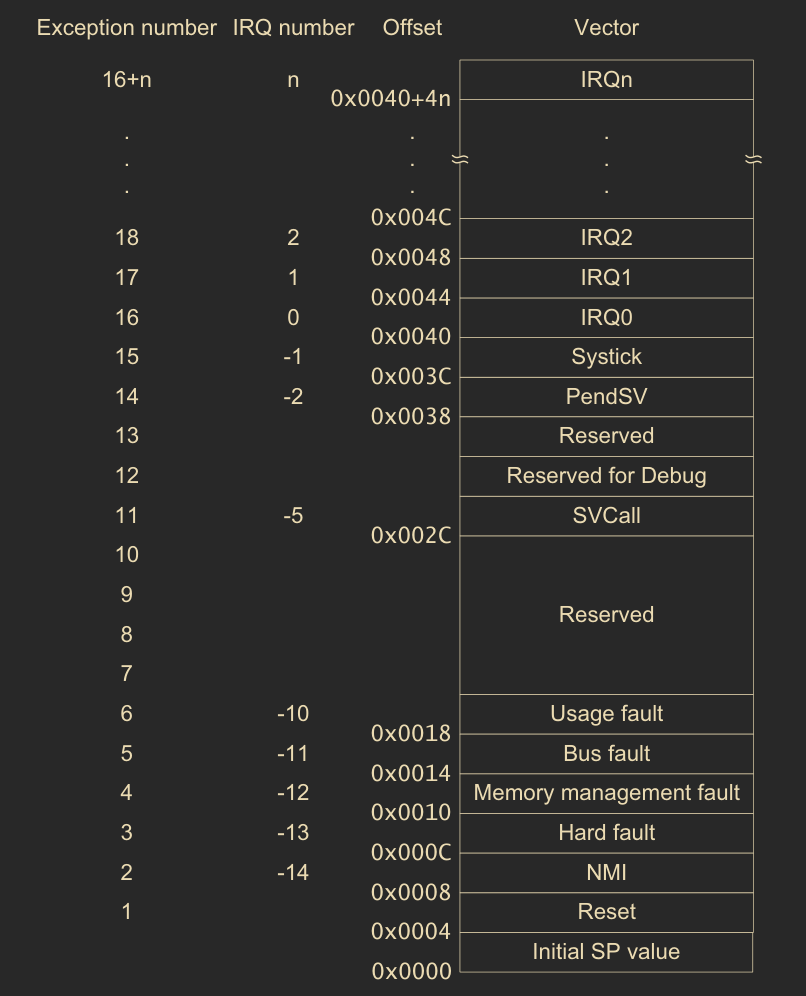
Vector Table, Cortex-M4 Devices Generic User Guide, v1.0 b
Let’s cross check that with the MCU Reference Manual. A complete vector table is visible on the page 203, and goes for several pages. Below I attached only the fist page, however the complete table, specified in the document, is necessary for the implementation.
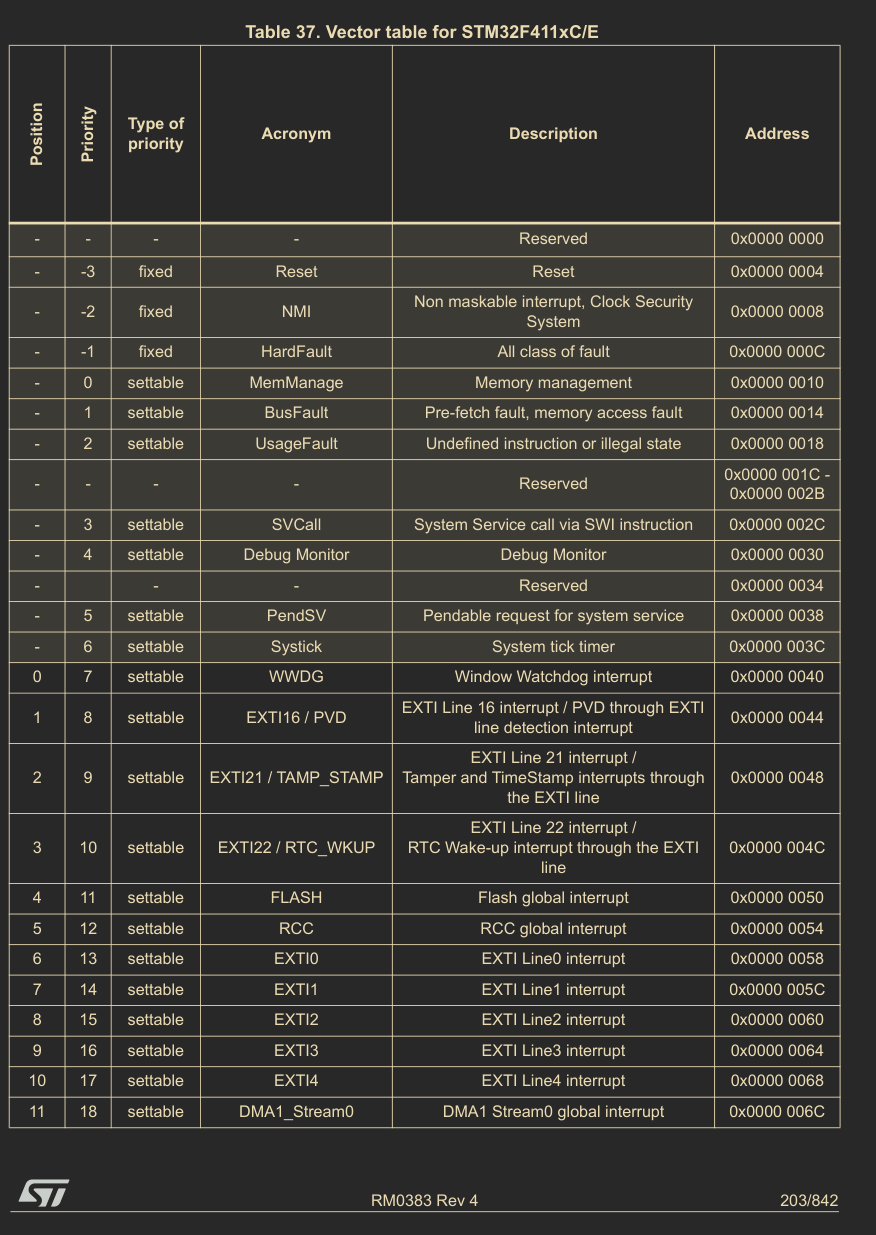
Vector Table, STM32F411 RM0383 Reference manual, rev 4
If we compare them, we’ll see that the vector table described in the MCU Reference Manual is much more detailed, and specifies all entries. That’s because it’s a device with already determined list of peripherals. On the contrary, the same CPU can be used in a variety of different MCUs, with a different set of peripherals, therefore it only specifies:
- top of the stack address,
- Reset handler,
- Non Maskable Interrupt handler,
- Fault Handlers,
- System Handlers,
as those are related to the CPU and not peripherals.
While defining vector table we have to take into acount several things, described per section.
Vector Table Placement
In the first step let’s declare an array in which we’ll store exception handlers. On page 37 of Cortex M4 Generic User Guide, below the vector table, we can find the address where the CPU expects it at:
On system reset, the vector table is fixed at address 0x00000000
Usually if we would define a const array, it would be most likely assigned to
.rodata or .text section, along with other constants. To get more control
over its placement, we can use GCC section
attribute,
to change target section for symbol. Later we’ll be able to use a linker script,
to ensure it’s placement within binary.
// startup.c
const uint32_t ISR_VECTOR[] __attribute__ ((section(".isr_vector"))) = {};
Initial Stack Pointer Value
First item in the vector table should be the address of a top of the stack. On the page 15 of Cortex M4 User Guide there’s CPUs stack description that states:
The processor uses a full descending stack. […] When the processor pushes a new item onto the stack, it decrements the stack pointer and then writes the item to the new memory location.
As the stack grows, it will use lower addresses. That means, it makes sense to place it at the end of the RAM, so it can grow until it reaches memory used for static allocation.
Now it’s time to check params of used device. On the page 48 of MCU Reference Manual there’s table presenting memory mapping, including address range of SRAM. We can now use the last address of that range, as the top of the stack.
![Table presenting memory map of addresses to memory areas. SRAM is mapped to addresses of range [0x2000 0000 - 0x2002 0000]](/img/ubmstm32-part2-startup-code/rm-stm32f411-sram-access-range.png#center)
Memory mapping, STM32F411 RM0383 Reference manual, rev 4
// startup.c
#define STACK_POINTER_INIT 0x20020000
Exception handlers
Now we have to define handlers to place in the array. There’s quite a lot of
them, and at the moment we may not need an implementation for each. There’s a
quite elegant solution that will help us provide generic implementation for
each handler, that can be later easily replaced with a specific one.
In the sample below I declared reset_handler which will contain startup code
and empty_handler which we will use as a placeholder for other exceptions,
both of which will require a specific implementation.
// startup.c
void empty_handler(void);
void reset_handler(void);
Next I added rest of the function declarations, and marked each with the alias
attribute.
It tells the compiler to create a symbol that points to another one. The result
is marked as weak, which means that it can be overwritten by other symbol
with the same name. Thanks to that, by default, every handler other than
reset_handler will point to the empty_handler, and it can be easily changed
by providing implementation for that handler. Symbol override is done by the
linker, therfore a proper implementation can be in a different translation
unit. This allows us to not handle interrupts in startup code, but
rather in the main program.
// startup.c
#define EMPTY_HANDLER "empty_handler"
void nmi_handler(void) __attribute__ ((weak, alias(EMPTY_HANDLER)));
void hard_fault_handler(void) __attribute__ ((weak, alias(EMPTY_HANDLER)));
void mem_manage_handler(void) __attribute__ ((weak, alias(EMPTY_HANDLER)));
// ...
// result of above code in assembly
.weak	mem_manage_handler
.thumb_set mem_manage_handler,empty_handler
.weak	hard_fault_handler
.thumb_set hard_fault_handler,empty_handler
.weak	nmi_handler
.thumb_set nmi_handler,empty_handler
// ...
Content Of The Vector Table
With all values prepared, it’s time to fill the array according to
table in MCU Reference Manual. It’s important to
remember about reserved blocks which require from us to omit some records.
// startup.c
const uint32_t ISR_VECTOR[] __attribute__ ((section(".isr_vector"))) = {
  STACK_POINTER_INIT,
  (uint32_t) &reset_handler,
  (uint32_t) &nmi_handler,
  (uint32_t) &hard_fault_handler,
  (uint32_t) &mem_manage_handler,
  (uint32_t) &bus_fault_handler,
  (uint32_t) &usage_fault_handler,
  0, // reserved
  0, // reserved
  0, // reserved
  0, // reserved
  (uint32_t) &svcall_handler,
  // ...
};
Unfortunately, some of the reserved blocks aren’t marked in a clear way.
For my device there were several such cases, for example between adc1_irq and
exti_9_to_5_irq. This reserved sector can be detected by noticing a jump in
position (first column) or address (last column, value jumped more than 4
bytes, which which is size of the address).

Vector Table, STM32F411 RM0383 Reference manual, rev 4
// startup.c
const uint32_t ISR_VECTOR[] __attribute__ ((section(".isr_vector"))) = {
// ...
  (uint32_t) &adc1_irq,
  0,
  0,
  0,
  0,
  (uint32_t) &exti_9_to_5_irq,
// ...
};
Exception Handlers
After initializing vector table, we have to provide implementation for two handlers we decided not alias.
Empty Handler
The goal of empty handler is just to be a fallback and a default implementation. I decided to define it just as an empty function:
// startup.c
void empty_handler(void) {}
Reset Handler
In the previous article from this series I described how linker assigns and
packs symbols into specific sections. In the reset code we will operate on two
of them: .bss which contains uninitialized (or initialized to 0) variables,
and .data which contains initialized variables.
Using Linker Symbols
The reset code will operate on symbols indicating address boundaries for each
section. Those symbols aren’t defined yet. That is the responsibility of
the linker script which I will cover later. The symbols we expect from the
linker are:
_sbss- start of the.bsssection,_ebss- end of the.bsssection,_sdata- start of the.datasection,_edata- end of the.datasection,_sidata- start of the initial values for the.datasection
First we have to tell the compiler, that we are expecting above symbols, and
that they won’t be found during the compilation. We can use the
extern
keyword for that.
// startup.c
void reset_handler(void) {
  extern uint32_t _sbss[];
  extern uint32_t _ebss[];
  extern uint32_t _sidata[];
  extern uint32_t _sdata[];
  extern uint32_t _edata[];
}
It’s quite surprising to have those symbols defined as arrays. After all we just want to represent an address, so we could use a pointer for that, right? It’s important to understand the difference between a symbol and a pointer. The pointer is a variable that stores another address, and the symbol is equal to the address. On the contrary, array simply starts at the specific address and that’s why it’s possible to use it to reference a linker symbol.
Clearing .bss
One of the goals of the reset_handler is to clear the .bss section. We can do
that by simply iterating over it’s address range, setting each byte to 0.
// startup.c
  uint32_t bss_size =  (_ebss - _sbss);

  uint8_t * bss = (uint8_t *) _sbss;
  for(int i = 0; i < bss_size; i++) {
    *(bss + i) = 0;
  }
Copying Initial Values To RAM
Variables are stored in RAM as it allows for the modification of it’s content.
However, RAM is a volatile memory, meaning that it won’t store values across
reboots. For that reason, we can’t use it to store the initial values for those
variables, because those need to remain after the device is restarted. To solve
that, we’re going to use the linker script, to duplicate .data section in
both RAM and ROM. Knowing that, we can implement initialization of variables
with values from the permanent storage:
// startup.c
  uint8_t * data_ram = (uint8_t *) _sdata;
  uint8_t * data_flash = (uint8_t *) _sidata;
  for(uint32_t i = 0u; i < data_size; i++) {
    *(data_ram + i) = *(data_flash + i);
  }
Calling main()
Last thing startup code has to do is to start execution of the main part of the
program, by convention represented by the function with the same name.
To do that we first have to declare main function as extern an then, call it
as the last instruction in the reset_handler. That will resume execution from
the main function, which is a well known entry point to the regular C program.
// startup.c
extern int main(void);
void reset_handler(void) {
   // ...
   main();
}
Linker Script
Linker script allows to fine-tune the default behavior of the linker, which is needed to achieve memory layout required by the target device.
Convention states that we need to specify an entry
point
for the program, which in our case will be reset_handler, as from it the
entire execution should always begin.
/* linker-script.ld */
ENTRY(reset_handler)
After that it’s time to define memory regions according to the previously mentioned memory mapping table. Later we’ll be able to assign certain sections to these memory regions, and the address of each region will be the base for symbol addresses. This allows us to divide the address space by the purpose, which is very useful and enables much more complex configuration.
/* linker-script.ld */
MEMORY {

  FLASH (RX) : ORIGIN = 0x08000000, LENGTH = 512K
  RAM (W) : ORIGIN = 0x20000000, LENGTH = 128K

}
With already defined regions, we can start specifying
sections. Let’s start
with the .isr_vector section, which should be at the beginning of the FLASH
memory:
/* linker-script.ld */
SECTIONS {

  .isr_vector : {
    . = ALIGN(4); /* 4 byte alignment - 1 word */
    KEEP(*(.isr_vector))
    . = ALIGN(4); /* 4 byte alignment - 1 word */
  } > FLASH
Above snippet defines an output section with the name isr_vector. The location counter represented as . is then
aligned
to the full word. Most likely the address is already aligned but it’s good
practice to always ensure alignment of sections. After cursor is aligned we
tell the linker to take .isr_vector section from any object file passed to
the linker, and place it’s contents at current location counter. The linker is often
trying to optimize the binary by removing symbols that are never referenced.
That’s usualy desired behavior, however vector table is necessary for correct
execution of the program on the device. Therefore, to exclude the .isr_vector section
from that behavior, we have to additionaly wrap it in the
KEEP()
function. We finalize section definition by aligning location counter again and
then assigning section to the FLASH region of memory.
Let’s now define the .text section. In this case, apart from .text section,
we can also include .rodata.
/* linker-script.ld */
  .text : {
    . = ALIGN(4); /* 4 byte alignment - 1 word */
    *(.text)
    *(.rodata)
    . = ALIGN(4);
  } > FLASH
Now we can do something very similar with the .bss section.
  .bss : {
    . = ALIGN(4);
    _sbss = .;
    *(.bss)
    _ebss = .;
  } > RAM
We can notice important differences while comparing this snippet to the
previous one. Now, at the begining of the section, we assign aligned value of
the location counter into the _sbss symbol, and then, after section content is placed, we
assign location counter to _ebss. Those symbols define addresses for the
start and the end of this section, and we’ve already used them in the startup
code. Another difference, easy to overlook, it that we assign this section to
the RAM region. That’s because .bss contains uninitialized or initialized to
0 variables, which means there’s no need to store any initial value for them.
The only section left is the .data section. I’ve already mentioned that it
has to be stored in both RAM and ROM, because we need both: a memory the program can
manipulate and permanent record of initial values. To achieve that, we need to
know the difference between VMA address and LMA address. It’s very nicely
put in the GNU LD
documentation:
Every loadable or allocatable output section has two addresses. The first is the VMA, or virtual memory address. This is the address the section will have when the output file is run. The second is the LMA, or load memory address. This is the address at which the section will be loaded. In most cases the two addresses will be the same. An example of when they might be different is when a data section is loaded into ROM, and then copied into RAM when the program starts up (this technique is often used to initialize global variables in a ROM based system). In this case the ROM address would be the LMA, and the RAM address would be the VMA.
Knowing that let’s define .data section with separate VMA and LMA regions, as
described in GCC LD Output Section
Description.
  .data : {
    . = ALIGN(4);
    _sdata = .;
    *(.data)
    . = ALIGN(4);
    _edata = .;
  } > RAM AT> FLASH
After describing the .data section, there’s one more symbol to define. We’ve already
specified the _sdata_ and _edata symbols, so in startup code we can use
both section size and it’s RAM address, but still we need to know where to
copy initial values from. We can use the
LOADADDR
function to get the LMA address of the section and then assign it to the symbol
_sidata marking the start of initial data.
_sidata = LOADADDR(.data);
Now, when both the startup code and linker script are complete, it’s time to analyze the results.
Analysis Of Results
The final responsibility of startup code is to call user defined main
function. However, we haven’t defined it yet. Let’s create main.c file with
main function doing nothing. We can also add some variables and a constant to
check if they’re correctly assigned to sections.
// main.c
#include <stdint.h>
uint32_t my_global_unitilialized;
uint32_t my_global_initilialized = 33;
const uint32_t my_global_const = 55;

int main(void) {
  return 0;
}
Let’s now compile and link all the files using custom linker script. We can use
gcc from previously downloaded arm toolchain, with additional params:
-mthmub- generate instructions in thethumbformat, which is the one supported by Cortex M4 (Cortex M4 Manual, page 49),-nostdlib- do not link to the standard system library, becasue we target bare metal platform,-mcpu=cortex-m4- compile for a specific CPU-T linker_script.ld- use custom linker script
arm-none-eabi-gcc startup.c main.c -o output.elf \
  -mthumb \
  -nostdlib \
  -mcpu=cortex-m4 \
  -T linker_script.ld
Now let’s take a look at the symbols of the output file, after sorting them by address for easier examination:
arm-none-eabi-objdump -t output.elf | sort
00000000 l    d  .ARM.attributes	00000000 .ARM.attributes
00000000 l    d  .comment	00000000 .comment
00000000 l    df *ABS*	00000000 main.c
00000000 l    df *ABS*	00000000 startup.c
08000000 g     O .isr_vector	00000198 ISR_VECTOR
08000000 l    d  .isr_vector	00000000 .isr_vector
08000198 g     F .text	00000006 empty_handler
08000198 l    d  .text	00000000 .text
08000198  w    F .text	00000006 adc1_irq
08000198  w    F .text	00000006 bus_fault_handler
# ...
08000198  w    F .text	00000006 window_watchdog_irq
0800019e g     F .text	0000008a reset_handler
08000228 g     F .text	0000000e main
08000238 g     O .text	00000004 my_global_const
0800023c g       *ABS*	00000000 _sidata
20000000 g       .bss	00000000 _sbss
20000000 g     O .bss	00000004 my_global_unitilialized
20000000 l    d  .bss	00000000 .bss
20000004 g       .bss	00000000 _ebss
20000004 g       .data	00000000 _sdata
20000004 g     O .data	00000004 my_global_initilialized
20000004 l    d  .data	00000000 .data
20000008 g       .data	00000000 _edata
output.elf:     file format elf32-littlearm
SYMBOL TABLE:
Vector Table
Below lines present that vector table is placed at the first address of the FLASH memory, as required.
08000000 g     O .isr_vector	00000198 ISR_VECTOR
08000000 l    d  .isr_vector	00000000 .isr_vector
Exception handlers
Output presents the address of empty_handler function, and that the handlers without
an implementation point to it’s address too. We provided implementation for the
reset_handler, therefore it has it’s own address.
08000198 g     F .text	00000006 empty_handler
08000198 l    d  .text	00000000 .text
08000198  w    F .text	00000006 adc1_irq
08000198  w    F .text	00000006 bus_fault_handler
# ...
08000198  w    F .text	00000006 window_watchdog_irq
0800019e g     F .text	0000008a reset_handler
Constant And Variables
The my_global_const symbol is visible in the .text section, assigned to FLASH, as expected.
The my_global_uninitialized symbol is located in the .bss section, and
my_global_initialized is located in the .data section. Both have addresses in the
RAM region. The .data and .bss sections are guarded by symbols marking the
start and end of each section. Additionally, the .sidata symbol points to the
initial values stored in FLASH.
08000238 g     O .text	00000004 my_global_const
0800023c g       *ABS*	00000000 _sidata
20000000 g       .bss	00000000 _sbss
20000000 g     O .bss	00000004 my_global_unitilialized
20000000 l    d  .bss	00000000 .bss
20000004 g       .bss	00000000 _ebss
20000004 g       .data	00000000 _sdata
20000004 g     O .data	00000004 my_global_initilialized
20000004 l    d  .data	00000000 .data
20000008 g       .data	00000000 _edata
Final Thoughts
We finally have the executable so it’s time to upload it into the device. However this is a topic for another article, as this one is already too long.
I hope that I’ve been able to shine some light on the topics of startup code and linker script. It’s been always a blackbox for me, and learning how it works brought me a lot of joy and clarity.
All the code from this post can be found on github.
Special Thanks
I’d like to thank Kristian Klein-Wengel from the Klein Embedded blog. His series about the STM32 without CubeIDE really helped me to get started with bare metal programming, and motivated me to explore those topics on my own.